Support our educational content for free when you purchase through links on our site. Learn more
12 Key Benefits of a Moving Checklist App 📦

A moving checklist app can make your move easier to manage by keeping tasks, deadlines, reminders, and shared responsibilities in one place. What are the key benefits of using a moving checklist app to manage your move and stay hassle-free? Less mental juggling, clearer priorities, and fewer chances of forgetting the small-but-essential stuff—like confirming the elevator before the moving truck arrives.
We’ve seen even organized movers get tripped up by scattered notes: the utility confirmation is in an email, the building access code is in a text, and the list of box contents is… somewhere. A single, regularly updated checklist won’t make moving day effortless, but it can turn a jumble of loose ends into a plan you can actually follow.
Key Takeaways
- Keep moving tasks, contacts, notes, and deadlines together instead of scattered across messages and scraps of paper.
- Use reminders and a personalized timeline to spot important tasks before they become last-minute emergencies.
- Share responsibilities clearly so family members or roommates know who’s handling what.
- Track boxes, expenses, documents, and address changes when those features suit your move.
- Choose a simple app you’ll actually use and check its current features and privacy practices.
- Verify important details directly with movers, landlords, building managers, and service providers; an app organizes your move but can’t confirm arrangements for you.
- Keep an offline or paper backup of move-day essentials in case your phone or internet connection lets you down.
Table of Contents
- ⚡️ Quick Tips and Facts
- 📱 What Is a Moving Checklist App?
- How digital moving planners work
- Moving checklist app vs. paper checklist
- 🏠 From Paper Lists to Moving Apps: How Move Planning Has Changed
- ✅ Key Benefits of Using a Moving Checklist App
- 1. Keep every moving task in one organized place
- 2. Build a personalized moving timeline
- 3. Reduce moving stress and decision fatigue
- 4. Set reminders so deadlines don’t slip
- 5. Coordinate family members and roommates
- 6. Track boxes, belongings, and inventory
- 7. Manage moving documents and important details
- 8. Budget for moving expenses and track spending
- 9. Compare movers and keep quotes organized
- 10. Stay on top of address changes and utility transfers
- 11. Access your moving plan on the go
- 12. Handle last-minute changes with less chaos
- 🗓️ What to Put in Your Moving Checklist App
- Eight weeks before moving day
- Four weeks before moving day
- One week before moving day
- Moving day and your first week at home
- 🔍 Features to Look for in a Moving Planner App
- Customizable tasks, due dates, and notifications
- Shared lists, collaboration, and task assignments
- Inventory tools, photos, and box labels
- Budget tracking, document storage, and syncing
- Offline access, privacy, and data security
- 📲 How to Choose the Best Moving Checklist App for Your Move
- Match the app to your move type and household
- Free moving apps vs. paid features
- Questions to ask before downloading
- 🧰 Moving Checklist App vs. Spreadsheet, Calendar, and Project-Management Tools
- 📝 How to Use a Moving App Without Overcomplicating Your Move
- Set up your move profile and timeline
- Prioritize tasks and assign responsibilities
- Review and update your checklist each week
- Keep a simple backup of essential information
- ⚠️ Common Moving App Mistakes to Avoid
- 🔐 Privacy and Safety Tips for Moving Apps
- 🚚 Do You Still Need Professional Movers?
- 💡 Quick Tips for a More Hassle-Free Move
- 🏁 Conclusion
- 🔗 Recommended Links
- ❓ FAQ
- Are moving checklist apps worth using?
- What is the best app for organizing a move?
- Can a moving app help me save money?
- Can I share my moving checklist with family or roommates?
- Should I use a moving app or a paper checklist?
- When should I start using a moving checklist app?
- Are moving checklist apps safe for storing personal information?
- 📚 Reference Links
⚡️ Quick Tips and Facts
A move has a sneaky way of turning “I’ll remember that” into “Where did I put the utility confirmation?” A moving checklist app can help by putting tasks, deadlines, notes, and shared responsibilities in one place. We recommend using one as your central move dashboard, not as a substitute for checking important details with your mover, landlord, or utility provider.
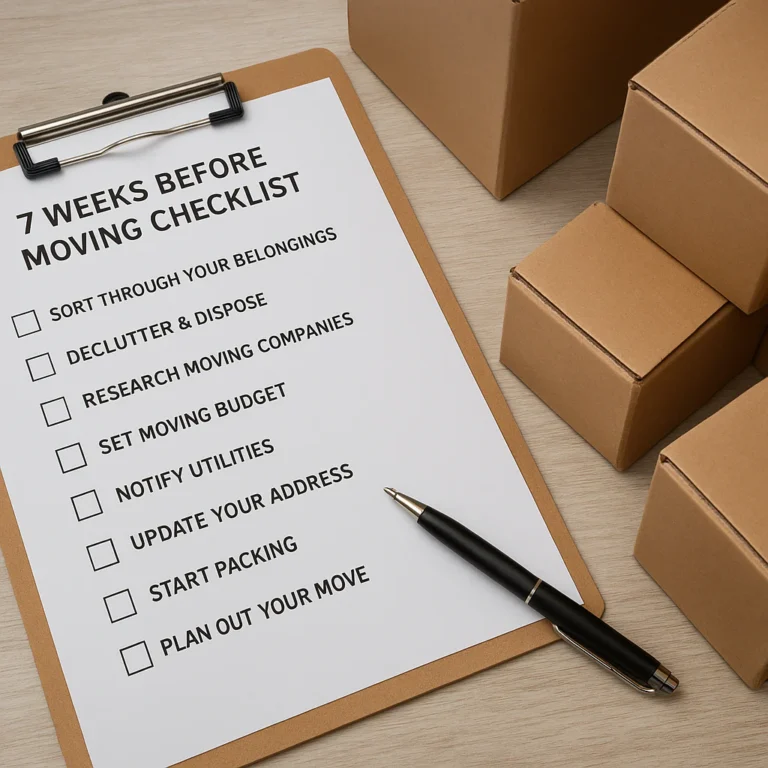
If your move is about seven weeks away, start with our guide to what to do 7 weeks before moving. The earlier you build a plan, the fewer urgent decisions you’ll have to make while surrounded by half-packed boxes. 📦
| Quick fact | What it means for your move |
|---|---|
| A checklist is most useful when it has dates and owners, not just task names. | Assign each task to a person and a deadline. |
| The right checklist depends on the move. | A local apartment move needs different tasks from a long-distance relocation or a work assignment. |
| Shared access can make household coordination easier. | Confirm that everyone can see and update the same list. |
| Moving apps vary in features and data practices. | Check the app’s current listing, privacy information, and device compatibility before relying on it. |
| Digital tools can fail at the least convenient time. | Keep essential contacts, confirmation numbers, and move-day notes available offline or on paper. |
Our quick-start plan:
- Add your move date and key milestones.
- Break the move into manageable tasks.
- Give each task a deadline and an owner.
- Add mover, landlord, utility, and building contacts.
- Review the list weekly, then daily as moving day approaches.
- Keep a backup of the essentials.
One key distinction: A checklist app helps you organize the move; it does not verify a mover’s credentials, guarantee an estimate, or make a rental listing legitimate. For long-distance moves, review our long-distance moving tips and verify important details directly with the companies involved.
📱 What Is a Moving Checklist App?
A moving checklist app is a digital planner designed to help you prepare for relocation. Depending on the app, it may include a task list, calendar, reminders, packing notes, inventory, expense tracking, or tools for sharing work with other people.
Some apps are built specifically for moving. Others, such as Google Tasks and Trello, can be adapted to manage moving tasks. Some moving companies also provide customer portals. For example, Mayflower’s MyMayflower Move Portal describes a customizable checklist, progress tracking, reminders, and move-management tools for customers.
How digital moving planners work
Most moving planners follow a straightforward pattern:
- Enter basic details: your move date, current home, destination, and move type.
- Review suggested tasks: the app may provide a standard timeline or checklist.
- Customize the plan: remove irrelevant tasks and add the details unique to your move.
- Set dates and reminders: give important actions a deadline.
- Track progress: mark tasks complete, add notes, or assign responsibilities if the tool supports it.
- Review and adjust: update the plan when dates, services, or household needs change.
Think of the app as a shared map of the move. It shows what’s next, but you still choose the route. If your building requires a loading-dock reservation, for instance, a generic checklist may not know that. You do.
The Federal Trade Commission’s moving guidance recommends researching movers and understanding the estimate and contract. Put those verification steps in your checklist rather than assuming an app has done them for you.
Moving checklist app vs. paper checklist
| Tool | Strongest use | Trade-off |
|---|---|---|
| Moving checklist app | Reminders, shared task ownership, mobile access, and flexible updates | Requires a charged device and may involve an account or data collection |
| Paper checklist | Quick, dependable reference without logging in | Harder to share, search, update, or back up |
| Spreadsheet | Custom timelines, budgets, and inventory tables | Can feel cumbersome on a phone |
| Calendar | Time-specific appointments and reminders | Less suited to tracking detailed packing or inventory |
| Project-management tool | Team coordination and complex multi-stage moves | May take more setup than a simple move requires |
Our movers’ take: Use the simplest system your household will actually maintain. An app that nobody opens is just a tiny digital scrapbook of good intentions. If you prefer paper, keep a printed master list and use your phone calendar for deadlines. You can also combine tools: a checklist app for tasks, a calendar for appointments, and a paper “first night” list.
🏠 From Paper Lists to Moving Apps: How Move Planning Has Changed
Moving plans used to live on clipboards, sticky notes, and the back of a takeout menu. Those tools still work, but digital checklists can make it easier to update dates, share responsibilities, and keep essential information with you.
Moving companies have also added online planning tools. Mayflower’s move portal, for example, describes a customer account with an interactive timeline and checklists for packing, supplies, first-night essentials, and items that may not be transported. That is a company-specific service, not a universal feature of every moving app. Check what your own mover offers.
A checklist also helps with transitions beyond the truck. The FDIC’s guidance on switching banks is about changing financial institutions, not changing homes, but it illustrates why transition tasks benefit from careful sequencing. The FDIC advises people to plan before moving their money, shift automatic payments thoughtfully, and monitor both accounts during the change. The same general lesson applies to a household move: make a plan, sequence dependent tasks, and verify that the change actually took effect.
For recurring relocations, the checklist needs to be reusable but not rigid. RotatingRoom’s travel-nurse moving guide notes that travel nurses may move frequently for assignments and recommends tracking housing, packing, and transportation tasks. A repeat-move template can save setup time, while a fresh review prevents last move’s assumptions from sneaking into this one.
✅ Key Benefits of Using a Moving Checklist App
The biggest benefit isn’t a magical, stress-free move. It’s fewer avoidable surprises. A well-maintained checklist helps you see the work, decide what comes next, and notice tasks that depend on other tasks.
1. Keep every moving task in one organized place
Moving tasks often live in too many places: texts, emails, a notebook, a family group chat, and that one note titled “IMPORTANT” from three months ago. A checklist app can bring tasks into a single view.
Add the details that make each task actionable:
- Task: Reserve the building elevator.
- Owner: You or another household member.
- Deadline: The date the building requires.
- Status: Not started, in progress, or done.
- Notes: Contact name, confirmation number, or restrictions.
Keep a separate category for must-do items such as confirming access, signing documents, and arranging transportation for pets or children. For household organization as you pack, see our home organization advice.
2. Build a personalized moving timeline
Many apps provide a suggested schedule, but your move may not match a generic eight-week plan. Your actual timeline depends on your lease, closing date, work schedule, building rules, travel distance, and whether you’re hiring movers or doing it yourself.
A practical timeline might include:
| Milestone | Example tasks |
|---|---|
| Early planning | Set a move date, research movers, review lease or closing requirements |
| Several weeks out | Declutter, arrange packing support, schedule utilities and address changes |
| Final weeks | Confirm access, pack nonessentials, label boxes, verify travel and delivery details |
| Final days | Pack essentials, prepare payment and documents, confirm arrival instructions |
| After arrival | Inspect belongings, unpack essentials, update local services and records |
Treat these as prompts, not universal deadlines. If a task involves a landlord, building, mover, or government agency, confirm the deadline with that organization. Our DIY moving tips can help you adapt the schedule if you’re handling the move yourself.
3. Reduce moving stress and decision fatigue
A checklist doesn’t make hard decisions disappear, but it can stop you from having to remember all of them at once. Instead of mentally rehearsing “Did we call the power company?” while packing a kitchen, you can check the list and focus on the box in front of you.
We’ve seen a simple habit help: each evening, choose three realistic tasks for tomorrow. Not thirty. Three. You’ll still have a long list, but tomorrow’s work will feel less like a swarm of bees.
For a checklist to reduce mental clutter, avoid adding every passing thought as a high-priority task. Sort items into:
- Time-sensitive: has a real deadline.
- Important: needs doing, but not today.
- Optional: helpful if time and energy allow.
- Not relevant: remove it from the plan.
4. Set reminders so deadlines don’t slip
Reminders are useful for tasks you can’t do too early or easily forget: confirming an appointment, following up on a quote, or checking whether a service transfer was processed.
Use reminders strategically:
- Set an alert before the final deadline, not only on it.
- Add a second reminder for tasks involving another company.
- Include a note about what you need when you call.
- Confirm completed actions with an email, receipt, or confirmation number.
A reminder saying “utilities” is less useful than one saying “Call utility provider to confirm service start date; save confirmation number.” The extra detail prevents the classic move-day performance of being transferred between departments while your phone battery slowly loses hope.
5. Coordinate family members and roommates
If several people are involved, a shared checklist can reduce duplicated work and the dreaded “I thought you were handling that.” Assign responsibilities clearly:
- One person confirms the mover and building access.
- Another arranges address changes and utilities.
- Each person packs and labels their own essentials.
- One designated person keeps the important documents and contact list.
Before relying on shared access, test it. Make sure everyone can view the list, receive notifications, and understand how task completion is recorded. Don’t assume that sharing an invitation automatically gives every person the right permissions.
If you’re moving with children, older relatives, or pets, create a separate care and travel group for medications, transport, appointments, and familiar comfort items. The task may be small; the consequences of forgetting it may not be.
6. Track boxes, belongings, and inventory
Some apps support inventory features; others let you add a simple room-by-room list. Either can help you keep track of what you packed and where it should go.
A useful box record includes:
| Field | Example |
|---|---|
| Box ID | KITCHEN-04 |
| Destination room | Kitchen |
| Contents | Mugs, kettle, coffee filters |
| Priority | Open first |
| Fragile? | Yes |
| Photo or note | “Kettle packed beside towels” |
Avoid writing sensitive information on a box label. “Bedroom—medication and documents” advertises more than you need to disclose. Use a private inventory note for sensitive contents and follow your mover’s instructions for valuables, medications, and items they won’t transport.
For a lighter move, work through our decluttering advice. The best inventory system is often the one that helps you decide what not to pack.
7. Manage moving documents and important details
A checklist app can act as an index for important move information, but think carefully before uploading sensitive documents. Depending on the app, you may be able to add a note, attach files, or store contact details. Review its privacy policy and use a strong, unique password if you create an account.
Keep a separate record of:
- Mover’s written estimate and agreement
- Building rules, elevator reservation, or access instructions
- Lease, closing, or storage details
- Insurance and inventory documentation
- Confirmation numbers and important phone numbers
- Receipts for services and supplies
The FTC’s advice on hiring movers emphasizes researching the company and understanding the paperwork. A checklist can prompt you to do that, but the app is not a substitute for reading the contract.
8. Budget for moving expenses and track spending
Budget tracking can help you see what’s already committed and what still needs planning. Add categories such as transportation, packing supplies, storage, cleaning, travel, and temporary accommodation. Record estimates separately from confirmed expenses.
A basic tracker might use these columns:
| Category | Planned? | Confirmed? | Paid? | Note |
|---|---|---|---|---|
| Moving service | ✅ | ✅ | No | Confirm delivery window |
| Packing materials | ✅ | No | No | Reuse clean boxes where suitable |
| Utility setup | ✅ | No | No | Verify start date with provider |
| Travel | ✅ | No | No | Keep essential documents accessible |
A checklist won’t guarantee savings. Its value is that it can expose omissions early, when you still have time to compare options, reuse supplies, or adjust plans. Don’t rely on an app’s estimate as a quote; get written information from the service provider.
9. Compare movers and keep quotes organized
Use your checklist to compare movers on service, scope, timing, communication, and documentation, rather than selecting the first company that answers the phone.
Track:
- Whether the estimate is based on a survey or a description of belongings
- Which services are included or excluded
- Pickup and delivery details
- Questions you asked and the answers
- Required deposits or payment procedures
- The company’s licensing and complaint information, where applicable
The Federal Motor Carrier Safety Administration provides consumer information for interstate moves, including ways to research moving companies. Verify details through official channels. A polished app interface or a high star rating alone does not prove that a mover is properly authorized.
10. Stay on top of address changes and utility transfers
Create separate tasks for each service rather than one vague reminder called “change address.” Depending on your situation, you may need to notify postal services, financial institutions, employers, schools, insurers, healthcare providers, subscription services, and utility companies.
For each item, record:
- The provider organization.
- How to submit the change.
- The date to make the request.
- The effective date.
- Any confirmation number or follow-up needed.
Use official websites or known customer-service numbers to make changes. The U.S. Postal Service’s change-of-address service is the official starting point for mail forwarding. Be cautious of lookalike sites that charge for services you can request directly from the relevant agency or provider.
The FDIC’s bank-switching guidance offers a useful caution from a different kind of move: automatic deposits and payments may take time to change, so plan ahead and monitor the transition. Apply that principle to household services too: a submitted request is not always the same as a completed transfer.
11. Access your moving plan on the go
Mobile access is handy when you’re at the hardware store, meeting a mover, or standing in a new home trying to remember which box holds the shower curtain. Before moving day, check whether your checklist works offline or whether you’ll need a connection to see it.
Keep these essentials available even if the app is unavailable:
- Mover and building contact details
- Addresses and access instructions
- Appointment times and confirmation numbers
- A list of essential items and medications
- Your move-day task list
If the app supports exporting or printing, save a copy. If not, use a secure note or printed sheet for critical information. Convenience is helpful; redundancy is what saves the day.
12. Handle last-minute changes with less chaos
Moves change. A closing date shifts, a truck arrival window changes, or a key pickup takes longer than expected. A checklist makes it easier to see what else depends on the changed task.
When a date changes:
- Update the affected milestone.
- Review tasks scheduled before and after it.
- Notify everyone responsible for those tasks.
- Confirm revised arrangements with the relevant provider.
- Mark the new confirmation in the checklist.
This is where a timeline earns its keep. If your move-in date shifts, for example, utility start dates, storage, travel, and temporary accommodation may all need a second look. Don’t just change one date and assume the rest of the plan will follow.
🗓️ What to Put in Your Moving Checklist App
Start with a template, then tailor it. The most useful list is not the longest one; it’s the one that reflects your home, your move date, and your responsibilities.
Eight weeks before moving day
If you have that much lead time, begin with decisions and dependencies:
- Set a tentative or confirmed move date.
- Review your lease, purchase timeline, or employer relocation requirements.
- Decide whether you’ll hire movers, rent a vehicle, or use a mixed approach.
- Research moving companies and request written estimates.
- Start sorting belongings and identify items to donate, sell, recycle, or discard.
- Check building rules, parking, elevator access, and move-in restrictions.
- Start a list of utility and address changes.
- For a long-distance move, organize travel and delivery questions in a separate section.
Our guide to what to do 7 weeks before moving provides a more detailed early-stage schedule. Adjust it for your actual move; a tight timeline needs prioritization, not guilt.
Four weeks before moving day
Now the plan gets more concrete:
- Confirm the mover or vehicle reservation.
- Ask the building about access, loading, and move-day rules.
- Begin packing items you rarely use.
- Arrange storage or temporary accommodation if needed.
- Confirm utility start and stop dates with providers.
- Update your address with essential organizations.
- Make a room-by-room inventory.
- Label boxes with destination room and a simple contents description.
- Plan transportation and care for children, pets, or anyone needing support.
If you’re moving for a temporary work assignment, don’t pack as if you’re relocating permanently. RotatingRoom’s guide for travel nurses recommends checking housing details such as furnishings, commute, parking, and included utilities before deciding what to bring.
One week before moving day
A week out, shift from broad planning to confirmation:
- Confirm arrival times, addresses, access, and contact numbers.
- Pack most remaining belongings and label boxes clearly.
- Set aside documents, medication, valuables, chargers, and daily essentials.
- Prepare a first-night bag or box.
- Dispose of or arrange safe handling for items your mover will not transport.
- Take photos of valuable items or existing property condition where appropriate.
- Confirm travel plans and parking.
- Keep cleaning supplies and basic tools accessible.
If you’re using a professional mover, ask them directly about restricted or non-allowable items. The FMCSA’s consumer moving information can help you understand interstate moving protections and what to verify.
Moving day and your first week at home
Moving day:
- Keep your phone charged and essential contacts handy.
- Walk through the home before loading and after rooms are cleared.
- Keep important documents and personal necessities with you.
- Confirm the destination, delivery arrangements, and access instructions.
- Record any concerns promptly and follow the mover’s process for documenting them.
First week:
- Open the essentials box first.
- Check that utilities, internet, and required services are functioning.
- Inspect delivered belongings and note any issues using the mover’s instructions.
- Update your checklist with remaining unpacking and local setup tasks.
- Keep receipts and confirmation records together.
A useful first-night box might contain bedding, a change of clothes, toiletries, medications, basic kitchen items, chargers, snacks, and pet supplies. It should be easy to identify, not buried under seventeen boxes marked “misc.”
🔍 Features to Look for in a Moving Planner App
There is no universally best moving app. Prioritize the features that solve your particular coordination problems.
Customizable tasks, due dates, and notifications
Look for the ability to:
- Add, edit, and remove tasks
- Set deadlines and reminders
- Group items by phase or category
- Mark progress and add notes
- Adjust the timeline when dates change
A ready-made checklist is a helpful starting point, but customization matters. A checklist that tells you to reserve a freight elevator is useful in a high-rise; a mandatory task about school transfers may be irrelevant if you have no school-age children.
Shared lists, collaboration, and task assignments
If other people are helping, check whether the app supports shared access, task assignment, and updates across devices. Ask:
- Can each person see the same current list?
- Can you assign a task to a specific person?
- Are notifications optional or adjustable?
- Can someone accidentally delete or edit another person’s work?
If the app’s collaboration tools are limited, a shared Google Calendar or Trello board may fill the gap. Keep one source of truth, though. Two competing checklists are how the spare key ends up in a box labeled “office.”
Inventory tools, photos, and box labels
Inventory support is valuable when you have many boxes, storage, or a long-distance move. Check whether the app lets you:
- Sort items by room
- Record box numbers and contents
- Add photos or notes
- Flag fragile or high-priority boxes
- Export or share the inventory
A simple spreadsheet may be easier if you need detailed records. For a smaller move, room labels and a short list may be enough. Choose a system proportionate to the move, not one that turns every sock into a data-entry project.
Budget tracking, document storage, and syncing
These features can be convenient, but they deserve a closer look:
- Can you distinguish estimated from confirmed expenses?
- Does the app sync across your devices?
- Can you download or export your information?
- Does it support attachments?
- What does its privacy policy say about uploaded content?
- Can you access your plan if the internet is unavailable?
Mayflower says its portal uses encrypted technology and password-protected accounts, but that statement applies to its own service. Don’t assume other apps have identical safeguards. Review the specific product’s current privacy and security information before uploading sensitive documents.
Offline access, privacy, and data security
A checklist may contain addresses, travel plans, or household details. Before entering information, check:
- What information the app collects
- Whether data is shared with third parties
- How to delete your account or data
- Whether offline access is available
- Whether notifications display private details on your lock screen
Use a unique password and avoid storing full financial account details or identity documents unless you have a clear reason and trust the provider’s safeguards. For sensitive records, a secure storage tool designed for documents may be more appropriate than a general checklist.
📲 How to Choose the Best Moving Checklist App for Your Move
Start with your move, not the app store. Ask what keeps slipping: deadlines, shared responsibilities, packing, inventory, or paperwork. Then look for the simplest tool that addresses that problem.
Match the app to your move type and household
| Move situation | Useful capabilities |
|---|---|
| Small local move | Simple checklist, reminders, contact notes |
| Family move | Shared tasks, calendar, school and care reminders |
| Long-distance relocation | Timeline, inventory, document organization, travel planning |
| DIY move | Packing and supply lists, vehicle and access tasks, loading plan |
| Frequent temporary moves | Reusable templates, compact packing lists, housing and travel checks |
| Move with storage | Box inventory, storage location notes, access reminders |
For temporary housing, verify the listing and the practical details before you commit. RotatingRoom focuses on housing for healthcare professionals and describes verification features for its platform. Whatever service you use, independently confirm the address, terms, furnishings, utilities, parking, and move-in arrangements.
Free moving apps vs. paid features
A free checklist may be enough for task tracking and reminders. Paid features might add collaboration, expanded storage, templates, exports, or inventory tools, depending on the product.
Before subscribing, ask:
- Does the free version cover my actual needs?
- Can I export or retain my data if I stop using it?
- Are paid features essential or merely convenient?
- Does the app have a clear cancellation process?
- Would a calendar and shared note accomplish the same thing?
Don’t pay for complexity you won’t use. If the move requires specialized planning, compare the cost and benefit of a paid tool with a spreadsheet or a moving-company portal.
Questions to ask before downloading
- Does it work on my phone and operating system?
- Can I change its suggested checklist?
- Can I share tasks with my household?
- Are reminders reliable and adjustable?
- Can I access essential details offline?
- Can I export or back up the plan?
- What personal information does it collect?
- Are there recent reviews describing the same features I need?
App features change, so verify details on the developer’s official page or app-store listing. User reviews can reveal usability frustrations, but they are individual experiences, not independent proof that an app is secure or right for every move.
🧰 Moving Checklist App vs. Spreadsheet, Calendar, and Project-Management Tools
| Tool | Best for | Watch out for |
|---|---|---|
| Dedicated moving app | Guided move timelines and relocation-specific task suggestions | Features and privacy practices differ by app |
| Spreadsheet | Custom budgets, inventories, and comparisons | Manual reminders and less convenient phone use |
| Calendar | Appointments, deadlines, and time-based alerts | Poor fit for detailed task notes and box inventories |
| Project-management platform | Shared ownership and complex moves | Setup overhead and unnecessary features |
| Paper checklist | Quick access and low-tech backup | Easy to lose, hard to update collaboratively |
Choose one primary checklist and use other tools to support it. For example, keep tasks in a moving app, appointments in your calendar, and only sensitive documents in a secure storage location. If your mover offers a customer portal, use it for mover-specific milestones while maintaining your own household checklist.
The right choice is the one that makes the next action obvious. If an app’s setup takes longer than packing a cupboard, simplify.
📝 How to Use a Moving App Without Overcomplicating Your Move
Set up your move profile and timeline
- Enter the confirmed move date, or mark it as tentative.
- Note your current and destination addresses where appropriate.
- Select the move type: local, long-distance, DIY, or professional.
- Add key constraints such as building access, work shifts, pets, or storage.
- Review the app’s suggested tasks and remove what doesn’t apply.
- Add tasks that only your household or building would know about.
If the app requests information you don’t need to share, skip it when possible. The checklist should help your move, not collect personal details for sport.
Prioritize tasks and assign responsibilities
For each task, add an owner and a realistic deadline. Then sort tasks by urgency and consequence:
- Critical: missing the deadline could disrupt the move.
- Important: needs completion but has some flexibility.
- Optional: improves convenience without blocking the move.
Assign one accountable person to each task, even when several people help. “Everyone will handle it” is not a plan; it’s a group-chat cliffhanger.
Review and update your checklist each week
Schedule a short weekly review:
- Mark completed tasks.
- Move unfinished tasks to a realistic date.
- Check for upcoming deadlines.
- Confirm tasks dependent on other people or providers.
- Remove duplicates and irrelevant items.
- Choose the next few priorities.
As moving day approaches, increase the review frequency. A weekly review may be enough early on; the last few days often call for a daily check.
Keep a simple backup of essential information
Make a secure backup of the information you would need if the app, phone, or internet connection were unavailable. At minimum, keep a printed or offline copy of:
- Addresses and access instructions
- Contact names and phone numbers
- Appointment and arrival windows
- Confirmation numbers
- Medication and essential-item reminders
Don’t print or leave sensitive records where they can be casually seen. A backup should improve resilience without creating a new privacy problem.
⚠️ Common Moving App Mistakes to Avoid
- Treating the default timeline as universal. Adjust it to your actual dates and obligations.
- Adding tasks without owners or due dates. A long list can look productive while nothing gets done.
- Overloading the app with sensitive information. Store only what you need and review the service’s privacy practices.
- Assuming a reminder means a service is confirmed. Check directly with the provider.
- Keeping multiple conflicting lists. Choose one master plan.
- Ignoring app updates or access problems. Test your account and backup before moving day.
- Using star ratings as your only mover-screening method. Verify company details, paperwork, and relevant authorization independently.
- Making the checklist too detailed. Track meaningful actions, not every breath taken near a box.
One lesson we’ve learned on move days: a simple list that people check beats a perfect list nobody remembers exists.
🔐 Privacy and Safety Tips for Moving Apps
Moving plans can reveal when your home will be empty, where you’re going, and how to reach you. Share that information thoughtfully.
- Download apps from official app stores or the developer’s verified site.
- Review the developer’s privacy policy and permissions.
- Use a unique password and enable available security protections.
- Avoid posting real-time move details publicly.
- Don’t store full payment-card or bank-account credentials in a general task app.
- Confirm moving-company contacts through official channels.
- Be cautious of unexpected payment requests, especially changes to bank details.
- Keep a record of agreements and payment instructions, and verify changes by calling a known number.
The FTC’s moving-company guidance offers consumer checks for hiring movers. For interstate moves, consult the FMCSA Protect Your Move resource. An app can remind you to verify a company; it cannot perform that verification for you.
🚚 Do You Still Need Professional Movers?
A checklist app helps you plan; it doesn’t decide whether a professional mover makes sense. Consider the move’s distance, amount of furniture, access challenges, schedule, physical demands, and the value of your time.
| Consideration | Hiring professional movers may help when… | DIY may suit you when… |
|---|---|---|
| Distance | The move involves a long route or complex delivery | The move is short and manageable |
| Household size | There are many heavy or bulky belongings | You have relatively few items |
| Access | Stairs, elevators, or restricted loading make handling difficult | Access is straightforward and permitted |
| Schedule | A coordinated crew reduces logistical pressure | You have flexible time and reliable help |
| Special items | You need experienced handling for specific belongings | You can transport items safely yourself |
Get and review written information, compare services, and confirm what is included. For a DIY move, include vehicle pickup and return, fuel, loading help, parking, and access in your checklist. For professional service, keep the agreement and communication records accessible.
💡 Quick Tips for a More Hassle-Free Move
- Start with the date and the biggest dependencies. Everything else builds around them.
- Use clear task names. “Confirm elevator reservation” beats “building.”
- Assign one owner per task. Helpers can still contribute, but accountability stays clear.
- Keep a first-night bag separate. Your toothbrush should not require a treasure hunt.
- Photograph box labels or key items if your chosen app supports it and you’re comfortable storing that information.
- Check restricted-item rules with your mover. Don’t guess about hazardous or prohibited goods.
- Schedule a weekly review. A few minutes can prevent a week of last-minute scrambling.
- Keep a backup. Phones run out of battery; paper remains stubbornly useful.
- For temporary housing, verify practical details such as furnishings, utility arrangements, parking, and commute before packing. The travel-nurse moving guide from RotatingRoom covers these considerations for frequent assignment-based moves.
- Watch the featured moving checklist app video for a brief introduction to MyMovingList and its planning approach. It may help you picture how a dedicated moving list can work, but check the app’s current features, compatibility, and privacy information before choosing it.
Our bottom line: a moving checklist app earns its place when it makes tasks visible, deadlines manageable, and shared responsibilities clear. Keep it simple, verify important details outside the app, and you’ll spend less time wondering what you forgot—and more time getting the kettle unpacked.